Timeline
The Timeline is your daily command centre. Every habit and task you've scheduled appears here in time order — making it instantly clear what you need to do, what's coming up, and what's already done.
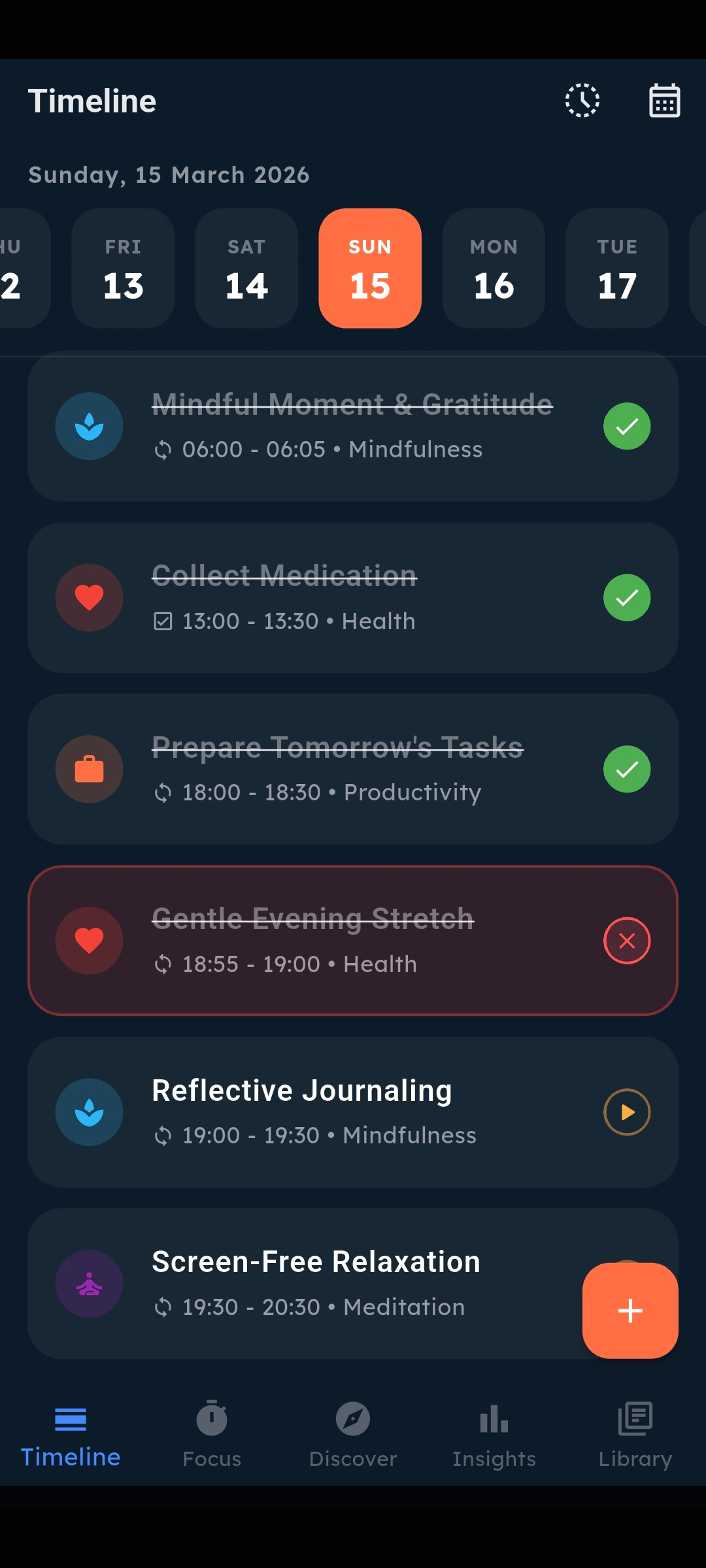
What the Timeline shows you
-
Recurring Habits
Your daily routines — scheduled or anytime — displayed with their category colour and icon.
-
One-Off Tasks
Single-action items with their own scheduled time, distinct from repeating habits.
-
Overdue Indicators
Amber ring and highlight on any habit whose scheduled time has passed but isn't completed.
-
One-Tap Focus Launch
Habits that require a focus session show a play button. Tap to jump directly to the Focus Timer.
-
Date Navigation
Scroll back through past days to review or update historical completions.
Status management
Long-press any item for the full status menu. You can mark habits as Complete, Missed, or Pending — and undo any action at any time. Missed items break your streak; pending items don't.
Complete
Adds to streak. Green checkmark.
Missed
Breaks streak. Explicitly acknowledged.
Pending
Default state. Not yet actioned.
Focus Timer
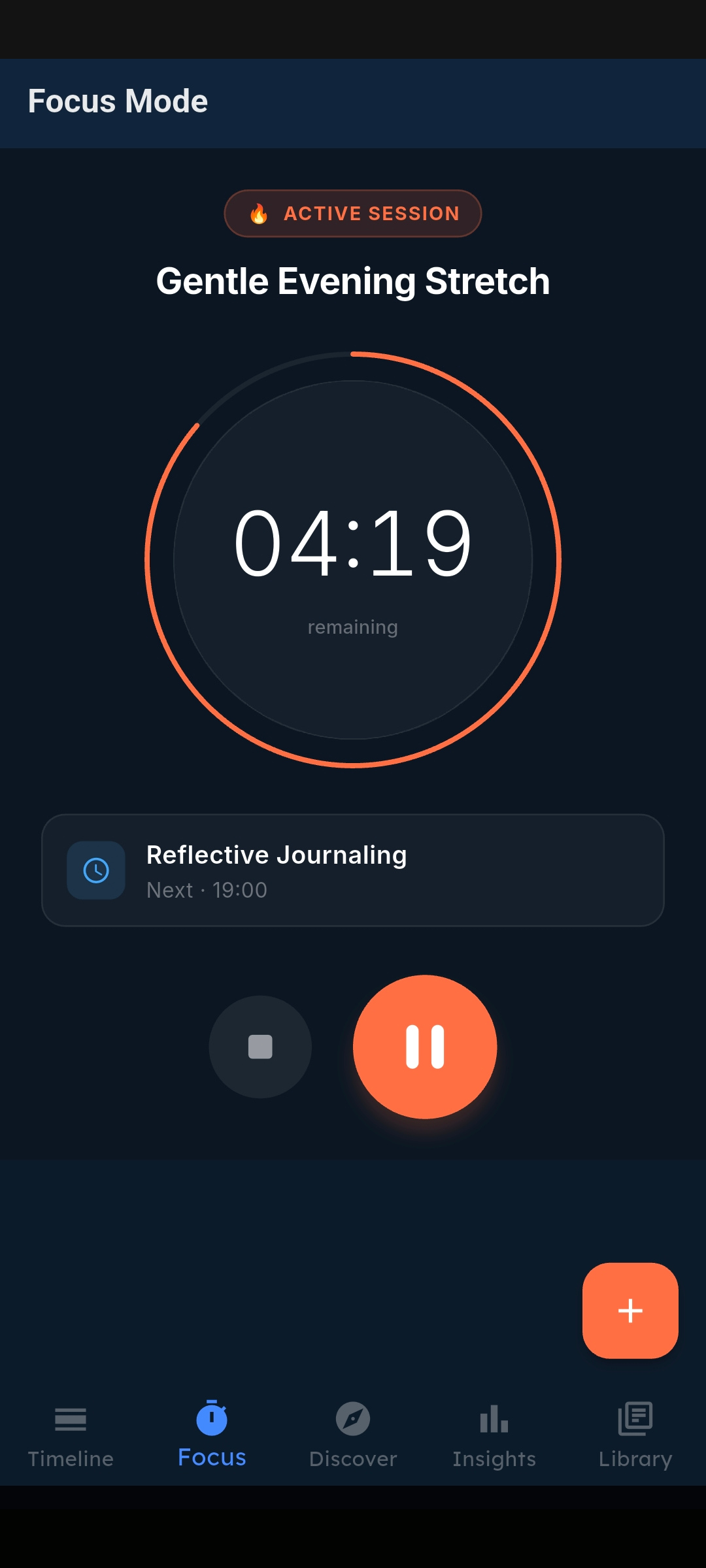
The Focus Timer transforms habit tracking into real deep work. When you tap the play button on a habit, the timer locks in to that session — circular ring progress, countdown display, and an immersive darkened background that signals you're in work mode.
-
Circular Progress Ring
An arc timer that depletes as your session runs. Orange while active, green when complete.
-
Dashboard Cards
See what's next on your timeline while the current session runs — one tap switches to the next habit.
-
Session Completion Sheet
When the timer hits zero, a summary sheet appears to log your session and return to the timeline.
-
Pause & Resume
Pause a session mid-way without losing progress. Resume exactly where you left off.
-
Immersive Mode
The screen subtly darkens when a session is active, creating a focus-first environment.
Pattern Scout & AI Coach
The Discovery screen has two powerful AI systems: Pattern Scout helps you find and adopt new habits, and the AI Coach analyses your actual behaviour to deliver personalised weekly and daily briefings.
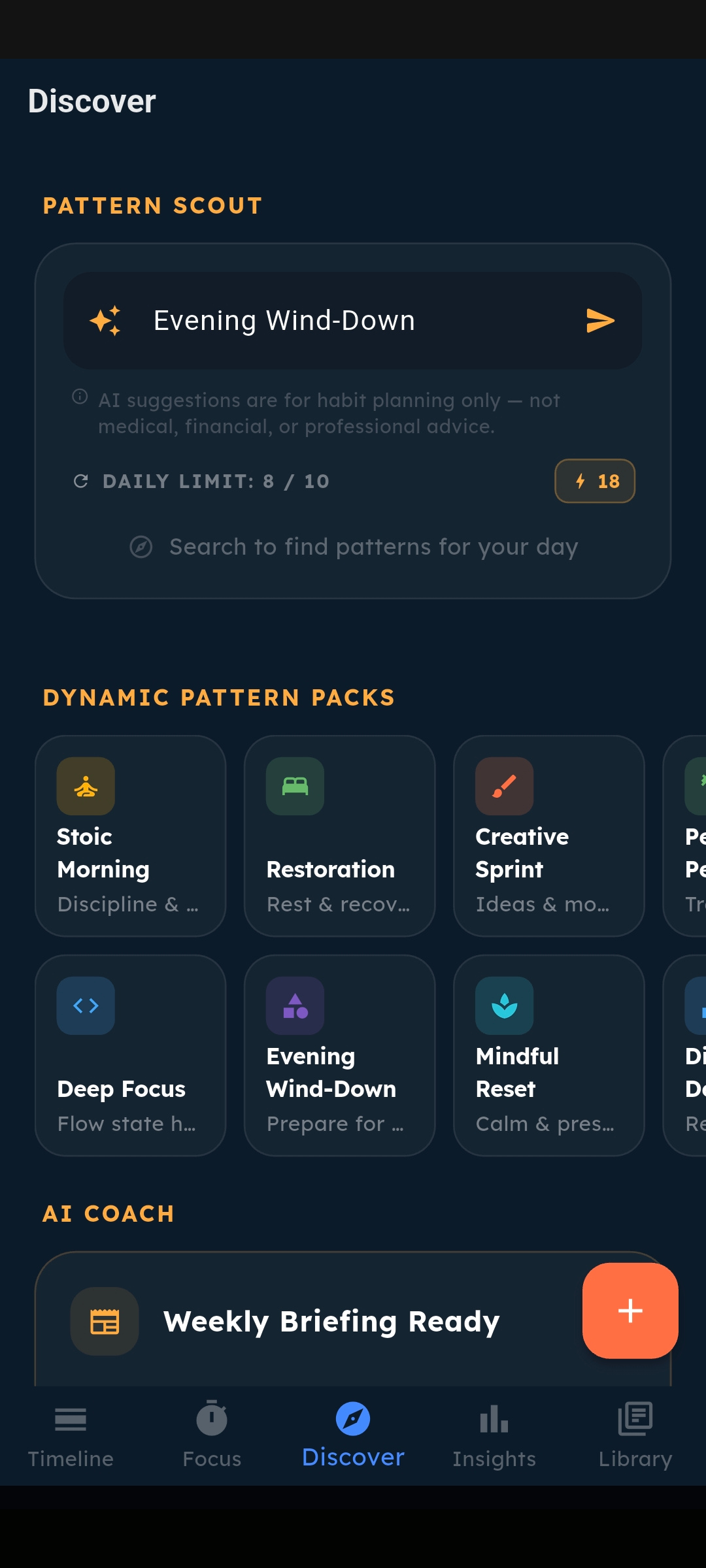
Pattern Scout
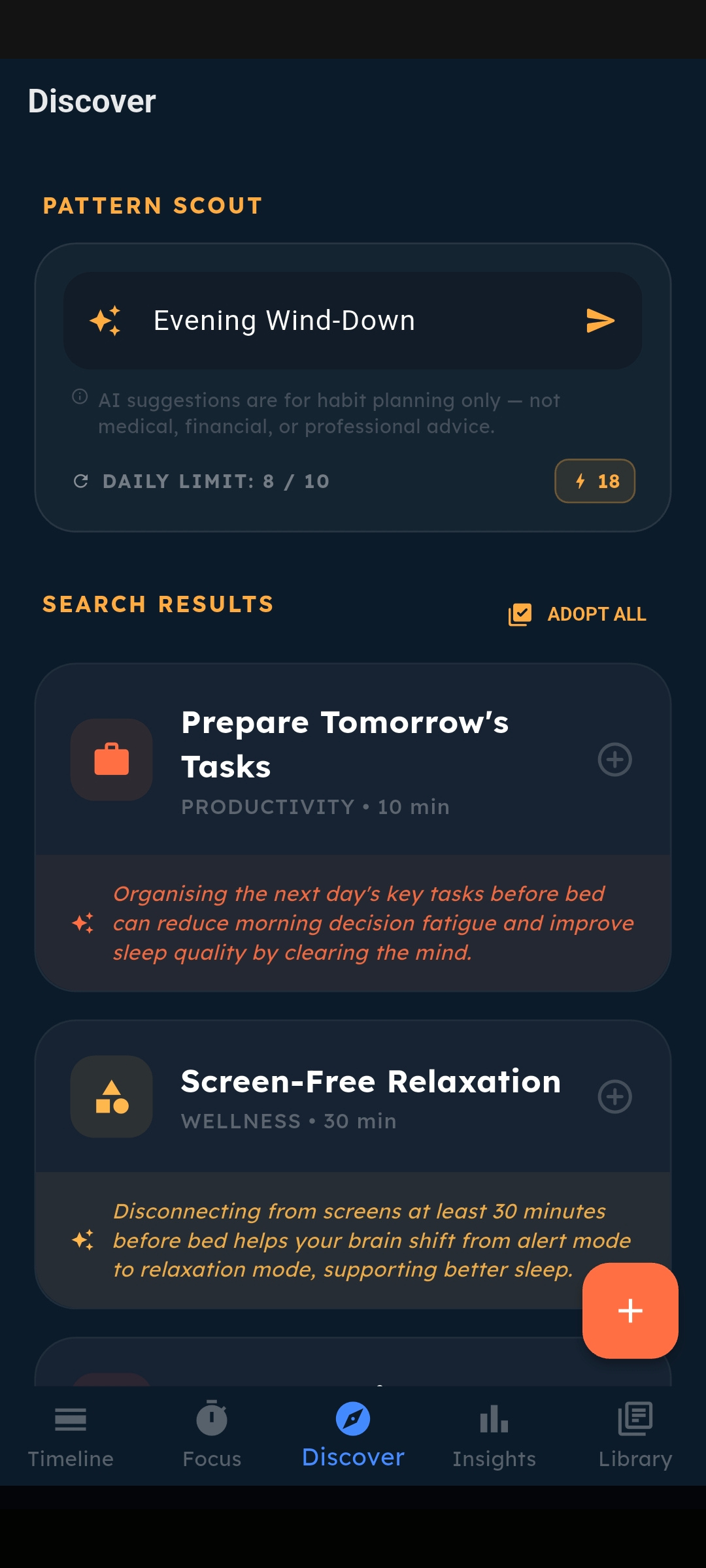
Type any goal, category, or lifestyle area — "Morning Routine", "Deep Work", "Fitness", "Mindfulness" — and Pattern Scout generates a tailored set of habit blueprints backed by behavioural science. Each result includes duration, category, and a personalised insight explaining why this habit matters for your goal.
Tap any suggested habit to open it pre-filled in the Add Habit sheet. Adjust and confirm — it's on your timeline.
Dynamic Pattern Packs
A scrollable horizontal grid of curated habit packs — Stoic Morning, Deep Focus, Restoration, Creative Sprint, and more. Each pack searches Pattern Scout with one tap.
AI Coach Pro Feature
The AI Coach doesn't just suggest habits — it reads your actual completion data and delivers two distinct types of coaching reports.
Weekly Executive Briefing
Every Monday at 6:00am, your Coach analyses your week — wins, missed habits, momentum trends — and delivers a structured performance report with specific recommendations for the week ahead.
Morning Primer
On weekday mornings, your Coach reviews today's scheduled habits and gives you a sharp focus brief — what to prioritise, what to watch out for, and how to approach the day.
All AI coaching is for habit guidance and productivity only. It is not medical, clinical, financial, or professional advice. Always consult qualified professionals for health and wellbeing decisions.
Scout Credits
Pattern Scout uses credits for AI searches. Free and Plus users can purchase booster credit packs as one-time purchases (5 credits for $0.39, 10 for $0.59). Pro users get 10 credits included daily, with the option to purchase additional boosters anytime.
Insights
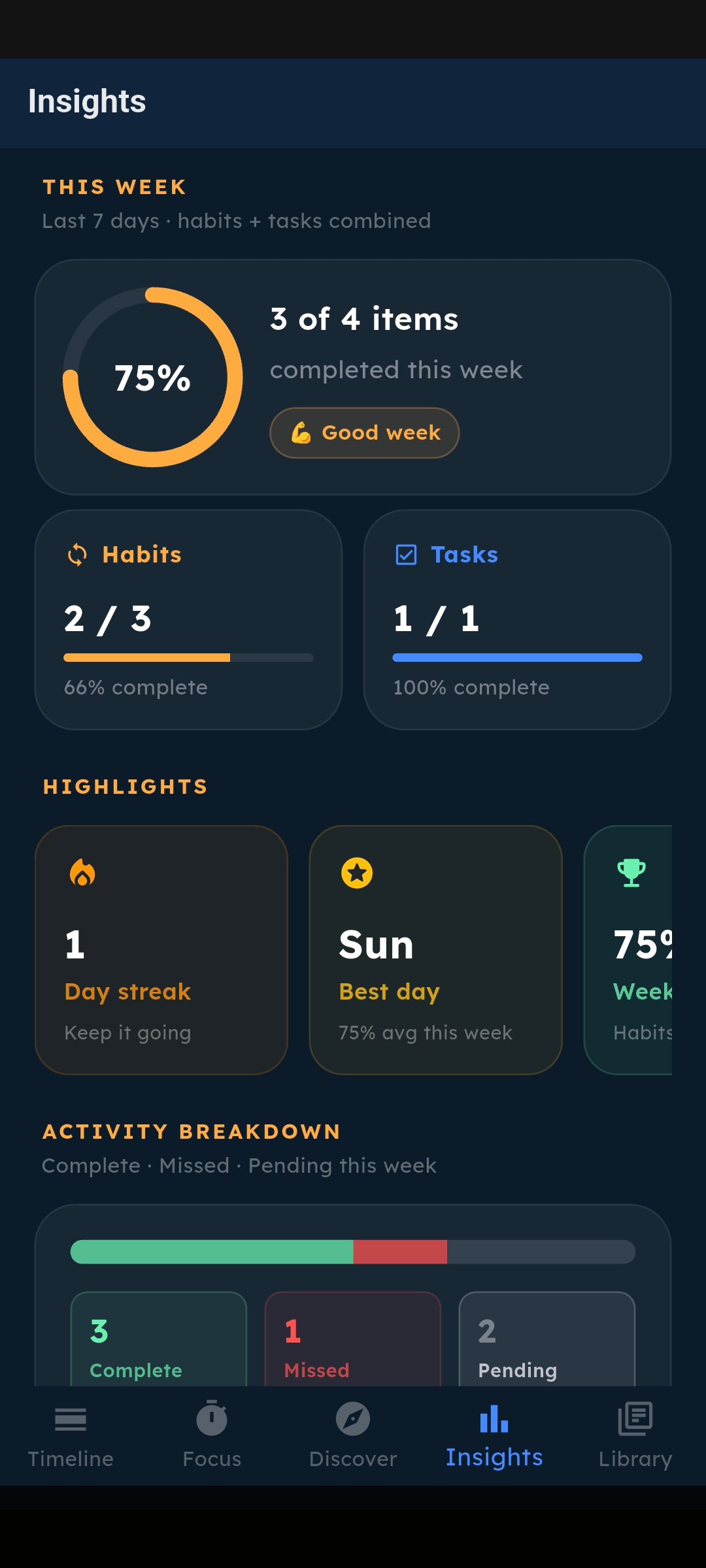
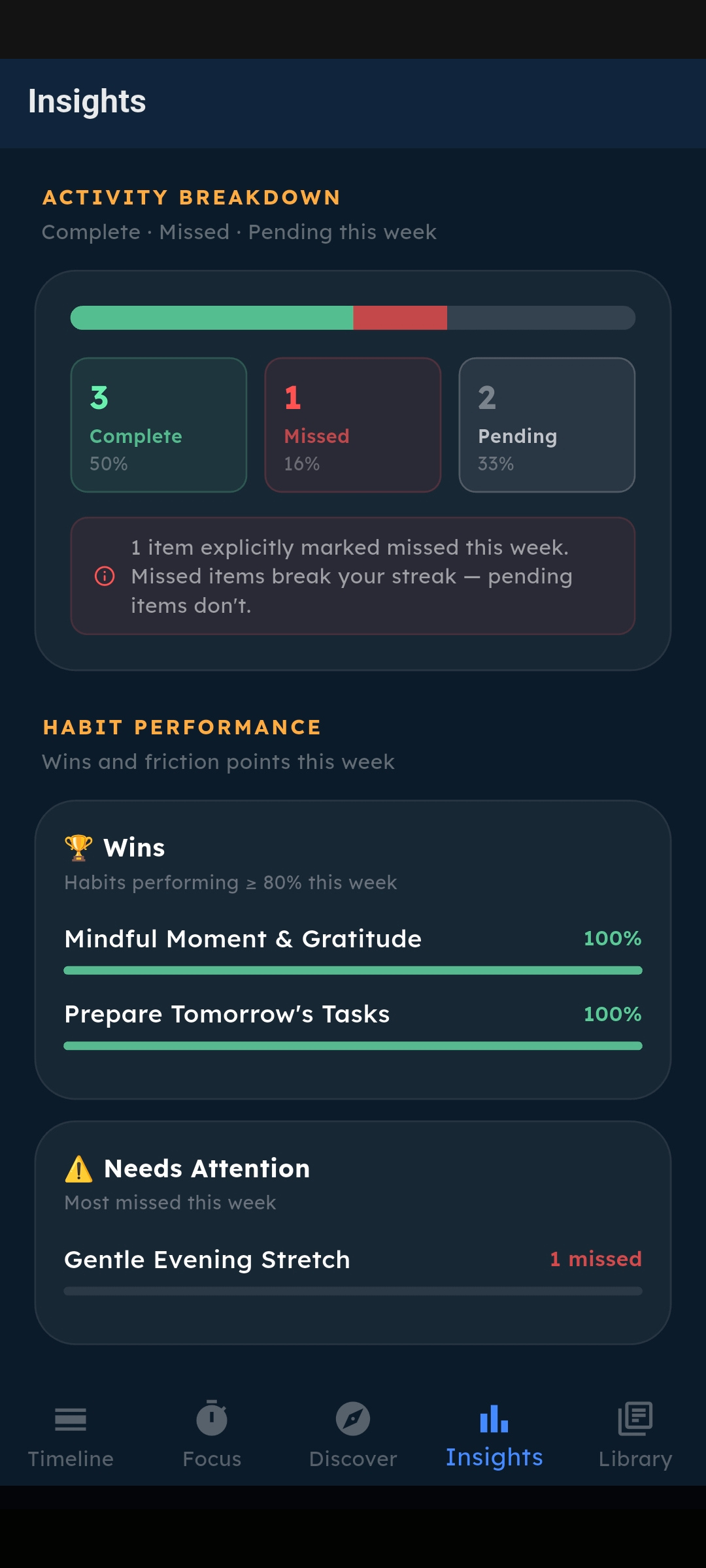
Insights is your performance dashboard — a full analytical view of your habit data. It's locked behind Plus to give free users a reason to upgrade, but every metric is genuinely useful.
-
Weekly Completion Ring
A circular progress indicator showing your combined habit + task completion rate for the last 7 days.
-
Habit vs Task Breakdown
Side-by-side completion cards for recurring habits and one-off tasks with progress bars.
-
35-Day Momentum Heatmap
A 5×7 grid showing intensity for the last 35 days. Colour depth = habits + tasks + focus time combined. Tap any cell for the exact date and percentage.
-
7-Day Trend Bars
A bar chart of daily completion rates for the last 7 days, colour-coded green/orange/amber.
-
Streak Habit Tracker
Dedicated section for streak-type habits showing day count, survival status, and motivational labels.
-
Habit Performance Cards
Wins (≥80% completion), friction points (most missed), and numerical progress metrics.
-
All-Time Stats
Total completions, habit completions, and task completions — your permanent record.
Library & Settings
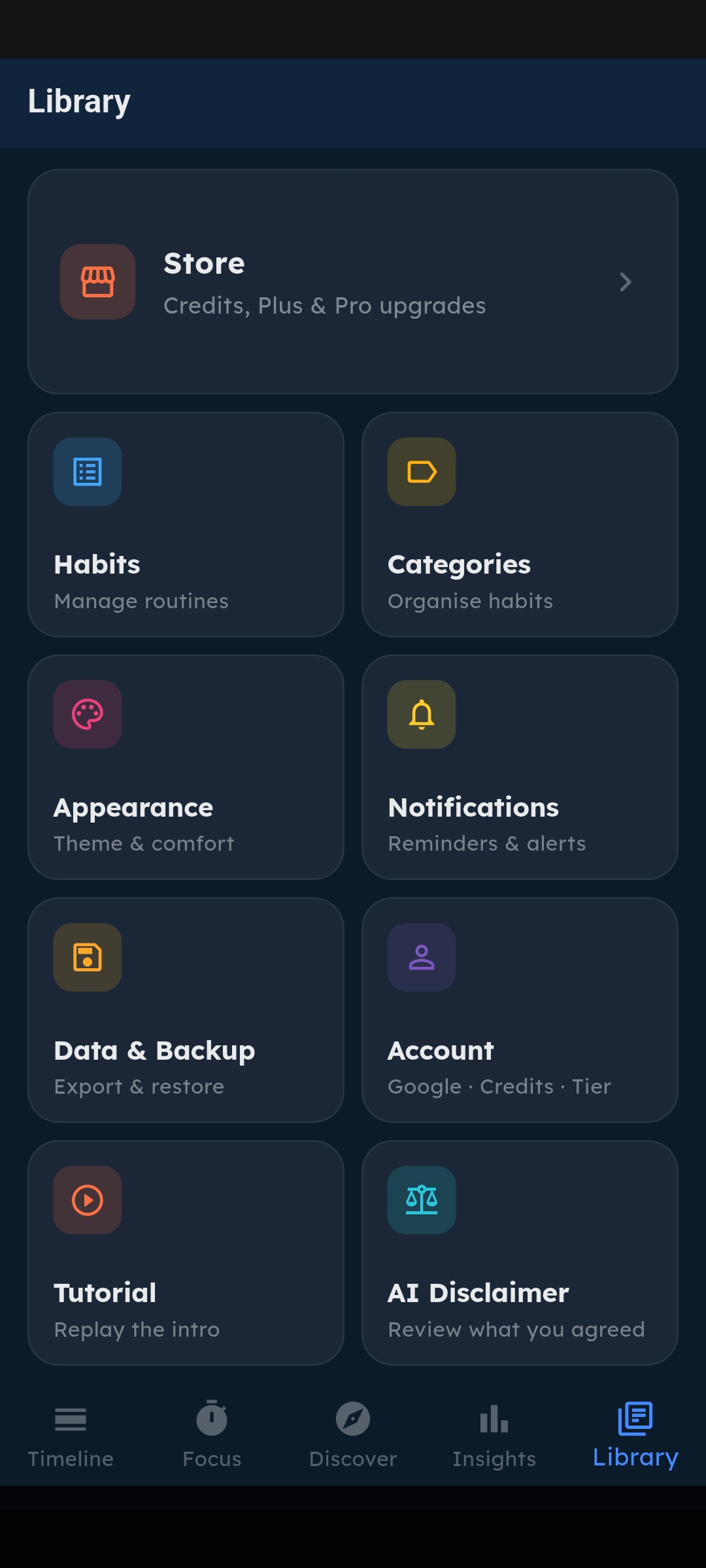
The Library is your app's control centre. Manage your habits, organise categories, adjust the app's appearance, and control every setting in one clean grid interface.
-
Habit Management
View, edit, and organise all your habits from one screen. See which are active, archived, or need attention.
-
Category Management
Create custom categories with your own colour and icon. Assign habits to categories for visual organisation.
-
Appearance
Toggle dark/light mode and customise the app's visual theme to your preference.
-
Data Backup & Export
Back up your habit history to Google Drive or export it as a CSV file for your own records.
-
Notification Settings
Configure per-habit reminders, notification channels, and global notification preferences.
-
Store
Upgrade to Plus or Pro, buy Scout credit booster packs, or restore previous purchases.
Habit Types
SteadyFocus supports four distinct habit goal types, each with its own completion logic and indicator style on the Timeline and Insights screens.
Binary
Did you do it or not? Simple toggle. Green checkmark when complete.
Duration
Complete after a set focus session time. Requires the Focus Timer.
Numerical
Track progress toward a target number. Arc progress ring shows completion fraction.
Streak
Count consecutive days survived. Missing resets the counter to zero.
Scheduling options
📅 Scheduled Time
Set a specific start and end time. The habit appears in chronological order on the Timeline with overdue indicators if the time passes.
🕐 Anytime
No fixed time. The habit appears on the Timeline to be completed whenever suits you that day.
📆 Day Selection
Choose which days of the week the habit appears. Build weekday routines, weekend-only habits, or any custom schedule.
🔔 Reminders
Set a push notification reminder for any habit. Choose how many minutes before the scheduled time to be notified.
Notifications
SteadyFocus uses smart, non-intrusive notifications to keep you on track without overwhelming you.
-
Habit Reminders
Per-habit push notifications at your chosen time, configurable per habit.
-
Task Reminders
Optional reminders for one-off tasks, set when you create the task.
-
AI Coach Notifications Pro
Push notifications when your Weekly Briefing or Morning Primer is ready to read.